Overview
Buildroot is a powerful tool that automates building cross‑compilers, kernel images, bootloaders, root filesystems, and entire minimal Linux environments. Combined with QEMU, it provides a fast and fully emulated setup without needing physical hardware.
Steps
0. Dependencies
Before building Buildroot, ensure the following packages are installed on your host system:
For Debian/Ubuntu:
sudo apt install build-essential git wget cpio unzip rsync bc python3 \
    qemu-system-arm qemu-system-misc qemu-utils flex bison libssl-dev
For Fedora:
sudo dnf install @development-tools git wget cpio unzip rsync bc python3 \
    qemu-system-arm qemu-system-aarch64 flex bison openssl-devel
For Arch Linux:
sudo pacman -S base-devel git wget cpio unzip rsync bc python qemu-full \
    flex bison openssl
These packages ensure Buildroot can build the toolchain, kernel, and filesystem, and that QEMU can emulate the AArch64 environment.
1. Get Buildroot
You can obtain Buildroot in two ways:
Option A: Clone from Git (recommended for development)
git clone https://gitlab.com/buildroot.org/buildroot.git
cd buildroot
Checkout the Latest Release. Buildroot releases follow a time‑based schedule. Using a stable branch ensures reproducible builds.
git checkout 2025.02.x
Option B: Download and extract a stable release
Visit the official release page: https://buildroot.org/download.html
Download a tarball (example):
wget https://buildroot.org/downloads/buildroot-2025.02.8.tar.gz
Extract it:
tar -xf buildroot-2025.02.8.tar.gz
cd buildroot-2025.02.8
2. Configure Buildroot
Load a predefined configuration suitable for QEMU AArch64:
make qemu_aarch64_virt_defconfig
This sets up Buildroot with:
- AArch64 toolchain
- Linux kernel for the QEMU virt machine
- Minimal root filesystem
- QEMU launch script generation
4. Build Everything
make
This step downloads sources, builds the cross‑compiler, kernel, root filesystem, and puts all final images under:
<buildroot>/output/images/

You should see files similar to:
Image– the kernel imagerootfs.ext2– root filesystemstart-qemu.sh– helper script to boot QEMU
Booting QEMU
Simply run:
./output/images/start-qemu.sh
Your Buildroot system will boot and drop you into a shell.
If QEMU reports a filesystem format issue like following, then rename the file:
mv output/images/rootfs.ext2 output/images/rootfs.ext4
Default login:
- Username:
root - Password: (empty)
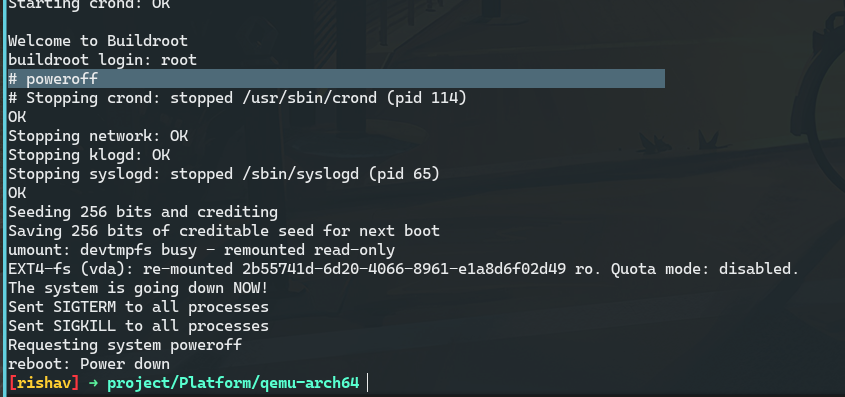
To exit the QEMU shell, just run
poweroffinside it.
Understanding QEMU Command
The start-qemu.sh script includes a full QEMU command. The key part is:
qemu-system-aarch64 \
	-M virt \
	-cpu cortex-a53 \
	-nographic \
	-smp 1 \
	-kernel Image \
	-append "rootwait root=/dev/vda console=ttyAMA0" \
	-netdev user,id=eth0,hostfwd=tcp::2222-:22 \
	-device virtio-net-device,netdev=eth0 \
	-drive file=rootfs.ext4,if=none,format=raw,id=hd0 \
	-device virtio-blk-device,drive=hd0
Meaning of each argument
qemu-system-aarch64
Runs the AArch64 (ARMv8) QEMU system emulator.
-M virt
Uses QEMU’s generic ARM virtual board (suitable for kernels with device tree).
-cpu cortex-a53
Emulates an ARM Cortex‑A53 CPU.
-nographic
Disables graphical output. UART appears on your terminal.
-smp 1
Configures one virtual CPU.
-kernel Image
Loads the kernel built by Buildroot.
-append "rootwait root=/dev/vda console=ttyAMA0"
Passes boot-time parameters:
rootwait— waits for root filesystem deviceroot=/dev/vda— root filesystem is the VirtIO diskconsole=ttyAMA0— kernel prints to the serial console
Networking
-netdev user,id=eth0,hostfwd=tcp::2222-:22
-device virtio-net-device,netdev=eth0
Creates a user-mode network interface and attaches a VirtIO NIC. Also, you can access port 22 from guest to port 2222 on host, which can be used for ssh.
Root Filesystem via VirtIO
-drive file=rootfs.ext4,if=none,format=raw,id=hd0
-device virtio-blk-device,drive=hd0
Loads the root filesystem image and exposes it as a VirtIO block device /dev/vda.
Preserving Build Outputs for Reuse
After a successful Buildroot build, it’s useful to store the important output files so they can be reused without rebuilding. The key artifacts are located under output/images/ and typically include:
Image— kernel imagerootfs.ext4— root filesystem imagestart-qemu.sh— script to launch QEMU- Device Tree Blob(s), if generated
Copy these files to a dedicated directory or versioned storage location:
mkdir -p ~/buildroot-artifacts/qemu-aarch64
cp output/images/* ~/buildroot-artifacts/qemu-aarch64/
This ensures reproducibility, allows quick environment setup later, and prevents accidental loss during configuration changes or rebuilds.